
Your own AI assistant. No subscription. Nothing leaves your house.
Free. Private. Runs on your computer. Jenna Lite lives on your Windows PC or Mac. She talks with you, remembers what matters to you, keeps your reminders and goals, and looks things up for you. Her brain runs on your own graphics card, not some company's servers.
Windows 10/11 or a Mac (Apple Silicon recommended; Mac support is new, in beta) · about 15 GB with her brain · free and open source (GPL v3). One download has both installers.
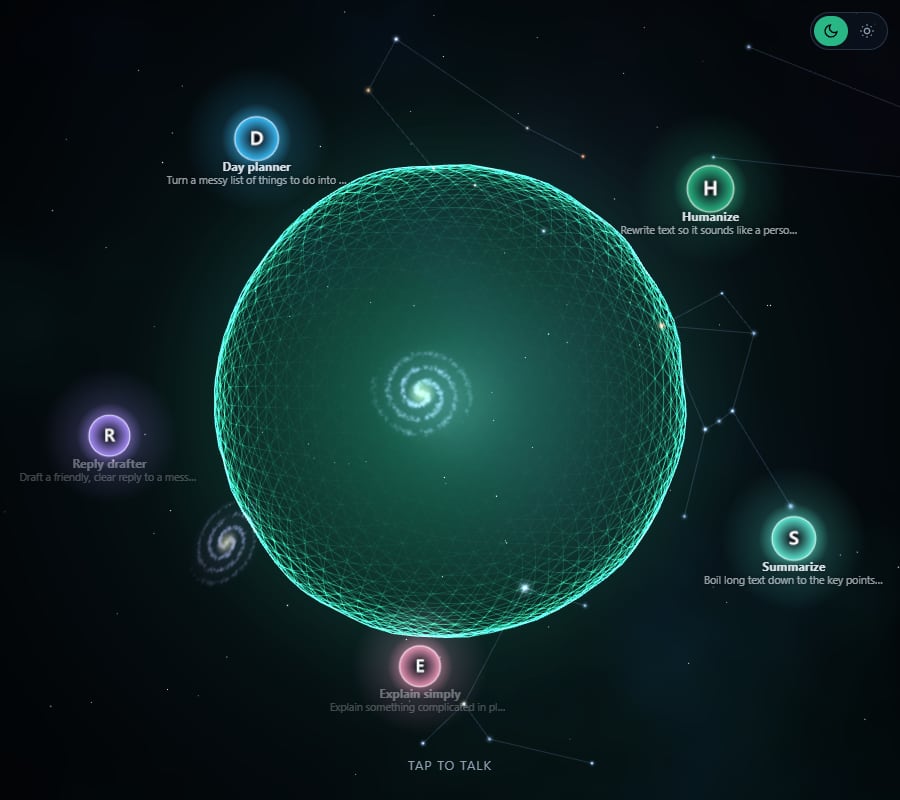
Tap her to say hi. This is the real app, running in your browser.
Real screenshots. Behind her: the night sky with real constellations, slowly turning. Her skills orbit her like moons.
What she does
Everything an assistant should do, without handing your life to a cloud.
Talks and listens
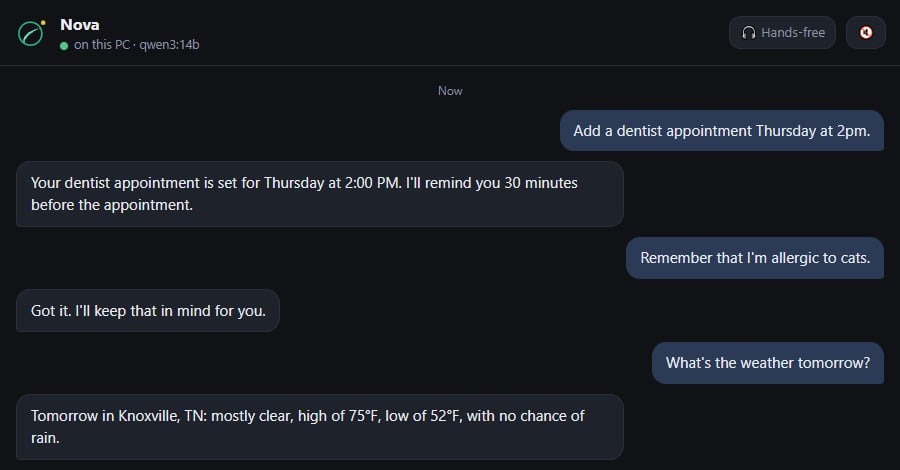
Tap and just talk, hands-free. She answers out loud in a natural voice. Hold F8 anywhere on the PC to ask without opening her.
Remembers you
Tell her something once and she keeps it. She asks a get-to-know-you question each morning, and her memories are notes you can read or delete.
Keeps you on track
Appointments, reminders and goals, with your calendar on her Today screen and a short good-morning check-in with the weather.
Looks things up
Web search, web pages and the weather. She names her sources, and when she can't find something she says so instead of making it up.
Has a Brain you own
Everything she learns is saved as plain notes in a folder on your computer, which opens in the free Obsidian app as a living map.
On your phone too
The same assistant on your phone through Tailscale, a free private network, or on Telegram. Nothing gets opened to the internet.
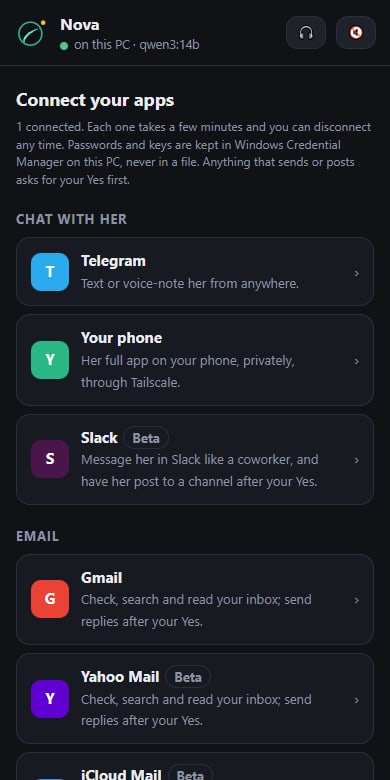
Connects to the apps you already use.
Every connection is a few minutes in her Connect tab, walked through step by step. She reads only when you ask, and anything that sends or posts waits for your Yes. Your passwords stay locked in Windows on your own PC.
- Chat with her
- Telegram · Slack · her app on your phone
- Gmail · Yahoo · iCloud · AOL · Zoho · Fastmail · any mailbox on your own domain
- Calendars
- Google · Outlook · Apple iCloud · any calendar link. Your appointments land on her Today screen.
- Notes
- Notion
- Pictures & video
- She makes pictures, edits your photos and makes short videos right in the chat, through the free ComfyUI app on your own computer. See one she made
- Social media
- Facebook Pages · Instagram · Threads · X. She drafts the post, you approve it. (X charges a few cents per post.)
Coming later: Outlook and Microsoft 365 email, Google Workspace email, TikTok, LinkedIn, YouTube and Pinterest. Some connections are brand new and marked beta in the app.
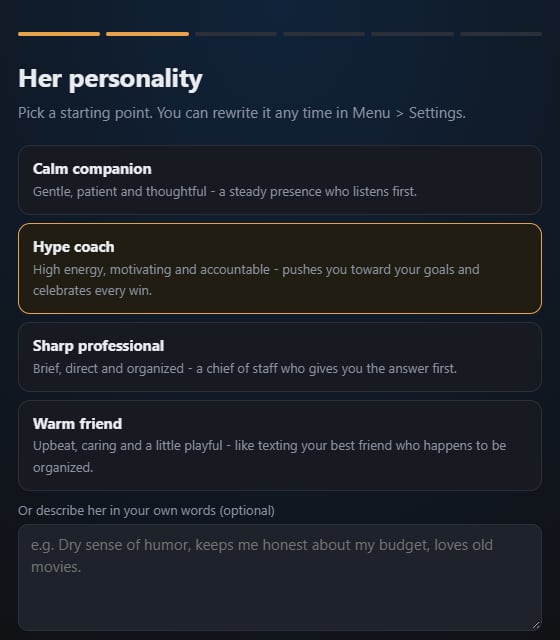
Pick her personality. Rename her. Teach her skills.
Setup takes about two minutes. Choose a warm friend, a sharp professional, a hype coach or a calm companion, or describe her in your own words. She builds her Brain while you watch.
- Skills like /summarize, /reply and /humanize are built in, and you can write your own in plain English
- Change her personality any time. She re-reads it with every message
- Emergency stop: type /pause and her tools switch off
Three steps to install
One installer does the hard parts. You don't need to know anything technical.
Download and unzip
Download Jenna-Lite.zip (under 1 MB), right-click it and choose Extract All. Put the folder somewhere permanent, like your Documents.
Double-click the installer
Windows: open Install Jenna Lite.cmd (if Windows says it protected your PC, click More info, then Run anyway). Mac: open Install Jenna Lite (Mac).command (if macOS can't check it, go to System Settings > Privacy & Security > Open Anyway). It installs what's missing, then downloads her voice and an AI brain sized for your computer. Plan on 10 to 30 minutes the first time.
Answer a few questions
Your name, hers and her personality. Then connect your phone if you like, and start talking.
| You'll need | Details |
|---|---|
| Windows 10 or 11, or a Mac | Macs with Apple Silicon (M1 or newer) run her well; Intel Macs work, slower. Mac support is new and marked beta. Linux isn't supported yet. |
| Enough memory for her brain | Windows: an NVIDIA card with 8 GB or more works well, 12 GB or more runs her smartest. Mac: 16 GB of memory works well, 32 GB or more runs her smartest. With less she still works, just with a smaller brain. |
| About 15 GB of disk space | Most of it is her brain, a one-time download. |
| A microphone | Optional. Only needed if you want to talk instead of type. |
Your conversations stay on your computer.
No account, no data collection, no AI company reading along. The only things that leave your computer are the web searches and weather lookups you ask for, plus Telegram messages and phone alerts if you turn those on.
Questions
Is it really free?
Yes. No trial, no ads, no upsell. Jenna Lite is open-source software under the GNU GPL v3, so you can use it, share it and look at every line of code.
How smart is she compared to ChatGPT?
She runs a smaller open model (Qwen3) on your own hardware, so she's quicker to say "I don't know" and won't write you a novel. For everyday help like reminders, remembering things, quick answers and talking a problem through, she's great, and she's yours.
Is it safe to install?
The installer only uses well-known free tools (Python, Ollama and FFmpeg - on Windows through its own package manager, on a Mac without needing your password) and puts everything in the folder you choose. Uninstalling is one double-click, and your notes are kept.
Can she make pictures, edit photos and make videos?
Yes. Install the free ComfyUI app once (her Connect tab walks you through it) and just ask: "make a flyer for my bake sale Saturday". She writes the detailed description, you tap Yes, and about a minute later the picture is in your chat. Send her a photo with the paperclip and say what to change ("make the sky a sunset") and she edits it. Everything runs on your own computer, free. You'll want an NVIDIA graphics card with 8 GB or more, or an Apple Silicon Mac. She makes short videos too (2-5 seconds, from a description or one of your photos). Those are slow on a home computer: about 10 minutes for a 3-second clip.

Does she work without the internet?
Talking, remembering, reminders and notes all work offline once she's installed. Web search, weather, Telegram and phone access need a connection.
Can you build one for my business?
Yes, that's what Clinch Valley Digital does. A custom assistant can connect to your email, calendar, website or customer list. Tell me what you need.
Want an AI assistant that knows your business?
Jenna Lite is the free version of the assistant I run every day. I build custom ones for local businesses that answer leads, keep the calendar straight and never forget a customer.
Get a free quoteJenna Lite is built with ideas and prompts from hellotrillion.ai. Voice by Kokoro, brain by Qwen3 through Ollama. Source code on GitHub